
Microsoft Fabric for business: buy it for the data problem, not the reports
Your board asks for one revenue number. Finance pulls it from the ERP, sales pulls it from Salesforce, and the BI team spends Monday morning explaining why the two don't match. Nobody is wrong. The data lives in four places and gets copied between them twice a day.
That scene is the whole argument for Microsoft Fabric for business. Buy it to fix a data problem: too many copies, too many tools, too many versions of the same number. Don't buy it to get nicer reports, because Power BI already does that for less. And don't switch it on until someone owns the data and someone watches the capacity bill.
Why Microsoft Fabric for business is about copies, not features
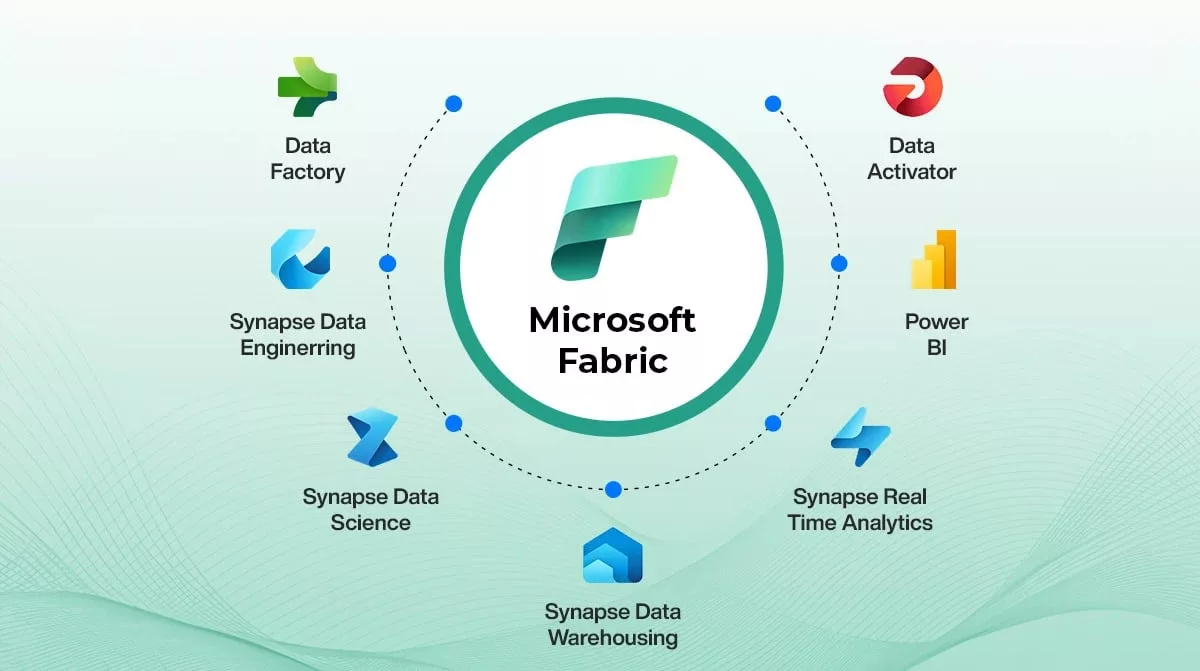
Microsoft Fabric is a software as a service (SaaS) analytics platform that covers end-to-end data workflows, from data ingestion and data transformation to real-time stream processing, analytics and reporting. There are no servers or storage resources to manage. Every workload reads and writes the same data in OneLake, which Microsoft's Fabric overview describes as a single data lake per tenant, built on Azure Data Lake Storage Gen2.
The workloads map to jobs your data team already does. Data Factory handles data integration through Power Query and 200+ native connectors, on-premises and cloud. Data Engineering runs Spark notebooks that clean raw data at scale. Data Warehouse runs SQL over open Delta Lake tables, with compute separate from storage. Data Science builds machine learning models with Azure Machine Learning experiment tracking. Real-Time Intelligence analyzes streaming data such as IoT sensor readings, app logs and clickstreams. Databases runs SQL databases in Fabric and mirrors Azure SQL, Cosmos DB, Databricks and Snowflake into OneLake. Power BI sits on top for business intelligence and data visualization.
Microsoft announced the preview at Build 2023 and general availability at Ignite 2023. It runs in your Microsoft Entra tenant and connects to Microsoft 365, so people can analyze Fabric data in Excel and share it in Teams. Adoption is real: Microsoft has "over 40,000 paid Fabric customers, up more than 60% year-over-year," CEO Satya Nadella said on the July 29, 2026 earnings call. That tells you the hiring pool is deep and Microsoft is investing. It doesn't tell you Fabric fits your business.
What decides fit is how your data platform grew. Most enterprise stacks were built one tool at a time: a data lake here, Azure Data Factory pipelines there, a separate warehouse or Azure Synapse Analytics, Power BI on top. That leaves data silos across multiple systems. Each hop is a copy, and each copy is a chance for numbers to drift, another security boundary and another line on someone's budget.
Fabric's core idea is to stop copying. OneLake shortcuts give zero-copy access to data already sitting in Azure Data Lake Storage, Amazon S3 or Google Cloud Storage. Mirroring continuously replicates operational databases into OneLake without hand-built pipelines. After that, the warehouse, the notebooks and Power BI all read the same tables. Engineers, analysts and decision-makers look at one shared dataset, and nobody rebuilds the same table three times. That's where the data management savings come from.
Microsoft also points to a Forrester Total Economic Impact study it commissioned in 2024. For a composite organization with $5 billion in revenue and 10,000 employees, Forrester modeled a 379% return over three years. Read that as a model built from customer interviews, not a forecast for your company.
Who should adopt Fabric now, and who should wait
Your current setup says more about fit than any feature list. This is how common situations read.
| Your situation | Read on Fabric |
|---|---|
| You're on Power BI Premium P SKUs | Strong fit. Microsoft is retiring the Premium per-capacity SKUs and tells customers to buy F SKUs instead, so you'll likely move anyway |
| You run separate lake, pipeline, warehouse (such as Azure Synapse Analytics) and BI tools | Strong fit. Consolidating them is where the savings and the single source of truth come from |
| Finance and sales data sit in SAP and Salesforce | Good fit. Business process solutions give you prebuilt models for exactly these sources |
| You have more than a few hundred report viewers | Worth modeling. On F64 and larger, viewers with a free license can open Power BI content; below F64, each viewer needs Pro or Premium Per User |
| Fewer than 250 Power BI users, reports only | Probably not yet. Microsoft notes Premium Per User is more cost-effective for Premium features under 250 users, and it doesn't need Fabric capacity |
| You already run Microsoft 365, Azure or Dynamics 365 | Good fit. Fabric runs in the same Microsoft Entra tenant, so identity and access carry over from the Microsoft ecosystem you know |
| Your data platform is mature on another cloud stack | Probably not. Shortcuts let Fabric read that data, but a migration needs a reason beyond novelty |
The "wait" rows deserve a closer look, because that's where most regret starts. A team building reports on a few well-modeled sources will get the same result from Power BI Pro or Premium Per User for less. A platform that already runs well on another cloud needs a business reason to move, not a product launch. And an organization where nobody will own data governance should hold off: Fabric will make its data easier to find and harder to trust.
There's a skills question too. Capacity management, Spark and Delta tables are different jobs from building Power BI reports. In practice, teams that skip training or outside help end up running the platform at a fraction of its value.
Business process solutions change the math for SAP and Salesforce shops
Building a clean finance model from SAP tables is slow, specialist work, and joining it to CRM data is harder still. Microsoft Fabric business process solutions are Microsoft's attempt to shortcut that. Microsoft announced a public preview in September 2025, and the product documentation now covers three domains.
Finance covers the general ledger, assets, accounts receivable and accounts payable, with prebuilt dashboards for financial statements, account balances and profitability. Sales follows the opportunity-to-cash process, from first opportunity through delivery, invoicing and payment. Procurement tracks purchase orders, goods receipts and vendor invoices for spend control and supplier risk.
Under the hood, it's a medallion architecture on OneLake. Raw data lands in a bronze layer, gets merged and kept current in silver, and is shaped into star schemas in gold for Power BI. It does the dull work that eats modeling time, like pulling account hierarchies from the source system and converting multi-currency purchase orders into one reporting currency. Prebuilt Copilot agents answer questions in natural language and draw on unstructured data from Microsoft 365 email, chats and documents. In finance, they can also help users make postings in the source system.
Supported sources today are SAP S/4HANA 1909 and newer, SAP ECC 6.0 and Salesforce through Fabric's own connector. To deploy it, you need an F2 or larger capacity (Microsoft recommends F32 or larger) or a Power BI Premium license, plus a Global administrator to enable it. Business data stays in your chosen capacity region.
So if your ERP is SAP and your CRM is Salesforce, this can save months of modeling. On any other ERP, you'll build those models yourself, the way Fabric customers always have.
AI comes after the data, not before
The AI pitch for Fabric is that once data sits in one governed place, AI can use it. That shows up in two features.
Copilot works inside each workload. It writes SQL in the warehouse, code in notebooks and draft reports in Power BI. Microsoft's Copilot documentation says it's on by default for paid F2 or larger capacities and isn't available on trial SKUs. It also draws on your capacity, so heavy use can slow other work.
Fabric data agents let business users ask plain-English questions of lakehouses, warehouses and semantic models. The agent turns each question into SQL queries, DAX or KQL, so nobody writes code to analyze data. Per the data agent documentation, agents are generally available, read-only, and use the asking person's own permissions. Answers are capped at 25 rows and 25 columns, agents work in English only for now, and they can't read unstructured files such as PDF or Word documents.
Our guide to Microsoft Fabric AI, Copilot and data agents covers each feature in depth. For a business case, one point matters most: AI-ready data is governed, modeled data. An agent pointed at a messy lakehouse gives confident answers to the wrong question.
A rollout that doesn't sprawl
Data analytics rollouts rarely fail on technology. They fail when a pilot turns into dozens of workspaces nobody owns. Microsoft's own Fabric adoption roadmap puts executive sponsorship, business alignment, governance and change management ahead of features. A sequence that respects that looks like this:
- Pick one number and one owner. Choose a figure leadership argues about, such as gross margin by region, days sales outstanding or forecast accuracy. Name an executive sponsor and a data owner for it.
- Run the trial on real data. The Fabric trial gives you 64 capacity units (CUs) for 60 days. Use real volumes, sized for next year's load, or your capacity sizing will be wrong. Copilot doesn't run on the trial, so test it on a small paid capacity if AI is part of the case.
- Connect before you copy. Use shortcuts and mirroring for existing sources before building new pipelines. You'll prove value faster and avoid a fresh set of copies inside the platform meant to remove them.
- Design domains, workspaces and capacities up front. Pick domains (often one per business unit) and map workspaces to them. Microsoft's governance guidance recommends separate capacities for development, test and production, which also gives you clean chargeback by team.
- Buy pay-as-you-go, measure, then reserve. Run production on pay-as-you-go for a month or two, watch real usage in the Capacity Metrics app, and reserve once the load is steady.
Our Microsoft enterprise services team would start with steps 1 and 3. That means agreeing on the one number, then checking which sources can be shortcut or mirrored instead of copied.
Governance is the real project
Pulling your organization's data into one place makes data discovery and data access easier. That's the point, and it's also the risk. Fabric's governance capabilities give you the controls for data governance, but someone has to set them.
Start with structure. Domains group data by business area and let you delegate some tenant settings to domain admins, so map every workspace to a domain from day one. Endorsement lets owners promote items and lets the organization certify the ones that meet its quality bar. Tell report builders to use certified models only. Fabric admins decide who can create workspaces, and the most common early mistake is letting everyone do it on day one. Restrict creation to a named group until domains and owners are in place, then widen it.
Then access. Workspace roles and data-level security control who sees what, down to tables, rows and columns in warehouses, SQL analytics endpoints, Direct Lake models and KQL databases. Lineage and impact analysis show what breaks downstream before someone changes a table. Every connection is authenticated with Microsoft Entra ID and encrypted by default, and OneLake data is encrypted at rest, per Microsoft's security overview.
Microsoft Purview adds sensitivity labels, data loss prevention and audit. Labels follow data from source to business user and stay attached when data is exported to formats such as Excel or PDF. Information protection and DLP need additional Purview licensing, so budget for it.
For regulated industries, Microsoft lists Fabric certifications including HIPAA BAA, ISO/IEC 27001, ISO/IEC 27017, ISO/IEC 27018 and ISO/IEC 27701. Those cover the platform. Your own controls still need their own audit trail.
Keeping the capacity bill predictable
Microsoft Fabric pricing is simpler than a stack of separate services, and easy to misread. You buy a capacity size, from F2 up to F8192, and every workload draws from that shared pool of capacity units.
| Item (US East, October 2026) | Price | Source |
|---|---|---|
| Fabric capacity, pay-as-you-go | $0.18 per CU hour | Azure retail prices |
| F2 (2 CUs), running 730 hours | about $263 a month | calculated |
| F64 (64 CUs), running 730 hours | about $8,410 a month | calculated |
| 1-year reservation | 40.5% less than pay-as-you-go | Power BI pricing |
| OneLake storage, hot tier | $0.026 per GB a month | Azure retail prices |
| Capacity overage | $0.54 per CU hour (3x the base rate) | Azure retail prices |
The capacity price is only half the bill. The other half is how Fabric handles spikes.
Fabric lets operations briefly use more compute than you bought, then smooths that usage over time. Microsoft's throttling guide says interactive operations are smoothed over at least 5 minutes and background jobs over 24 hours. That's why a nightly load doesn't block morning reports.
When smoothed usage runs ahead of capacity, throttling arrives in stages. Once you've used the next 10 minutes of capacity, new interactive requests wait 20 seconds. Past 60 minutes, new interactive requests are rejected, and past 24 hours everything is. Users see an error asking them to try again later, which is not a message anyone wants in front of a CFO.
You have three levers before that happens. Surge protection lets a capacity admin reject new background jobs once usage crosses a set threshold, which protects interactive users. A newer workspace-level option, still in preview, caps how much compute any one workspace uses in a rolling 24 hours, and you can exempt critical workspaces.
Capacity overage covers excess usage instead of throttling, at three times the pay-as-you-go rate. It's on by default when you create a capacity, and the 24-hour threshold you set isn't a hard cap, so charges can exceed it. Treat it as a safety net, not a budget. Microsoft suggests keeping the threshold below one-third of your daily CU hours; past that, scaling up usually costs about the same.
Finally, F SKU capacities can be paused and resumed, on a schedule if you like. Pausing bills any smoothed usage still owed, and content on a paused capacity goes offline. Dev and test capacities are the natural candidates.
FAQ
Is Microsoft Fabric free?
No, not for production use. Every user gets a free Fabric license on first sign-in, and the trial gives you 64 capacity units for 60 days. Production workloads need a paid F capacity, which starts at F2 and is billed per second through Azure.
Do we have to move from Power BI Premium to Fabric?
If you buy Power BI Premium per-capacity (P) SKUs, most likely yes. Microsoft is retiring those SKUs and recommends Fabric F SKUs for new and existing customers. Plan the move at your next renewal, not the week the term ends.
Who should own Microsoft Fabric in a company?
Ownership is usually shared across roles. Microsoft's guidance has Fabric admins set tenant-wide policy, domain admins manage their business area, and workspace owners control their own content. A center of excellence that includes business and IT works best for deciding domains and standards.
Where to start
Start with the number your board keeps asking for, and price the capacity to produce it. We're a Microsoft Solutions Partner, and our Power BI consulting and Azure cloud teams can size that first production capacity with you from real Capacity Metrics data. Talk to our Microsoft team.
Related reading
 How to choose a cloud ecommerce model your team can actually runMay 4, 2023 · 9 min read
 How to build Azure cloud solutions that still make sense in year threeMay 6, 2025 · 12 min read
 Headless Shopify vs. Traditional Shopify: Which Architecture Is Right for Your Growth Stage?May 25, 2026 · 10 min read
Planning a Microsoft platform project in Southeast Asia? See Brainvire’s Microsoft solutions in Singapore and Microsoft solutions for Thailand.