Consulting
Advisory on Microsoft licensing, architecture, and a right-sized Office 365 roadmap tied to your business objectives.
AI readiness assessment Consulting Americas' Fastest-Growing 2025
One page from a senior architect, within two business days. The single highest-payback AI move in your Odoo, Adobe or custom stack, and the two things to leave alone. Yours to keep.
One page from a senior architect in two business days: your highest-payback AI move, and what to leave alone.
Brainvire is a Microsoft Solutions Partner delivering Office 365 services end to end: consulting, implementation, customization, data migration, integration and managed support. Your Microsoft Office 365 consultant moves mailboxes and files without data loss and keeps Microsoft Teams, SharePoint and Outlook secure for distributed teams. Licenses are easy to buy. Adoption is the work.
Trusted by enterprises on the Microsoft stack












/ Microsoft, on the record
Every figure below comes from a documented engagement. Every card is one client, on the record: two builds on the wider Microsoft platform, and two built on SharePoint, one of them embedded in Office 365.
 Logistics · Microsoft
43%
Boost in logistics efficiency
A freight-management web application on the Microsoft stack delivered 43% higher logistics efficiency and 95% accurate location tracking.
Read the case →
 Healthcare · Microsoft
40M+
Lives supported via connected network
A supply-chain solution connected 50+ community blood centers on the Microsoft platform: 40M+ lives touched, $150M in materials distributed.
Read the case → Enterprise · SharePoint + Office 365
DMS
Centralized document system on Office 365
A SharePoint document-management system, embedded in Office 365, gave teams role-based, anytime access to files across every device, with Power BI reporting.
Read the case →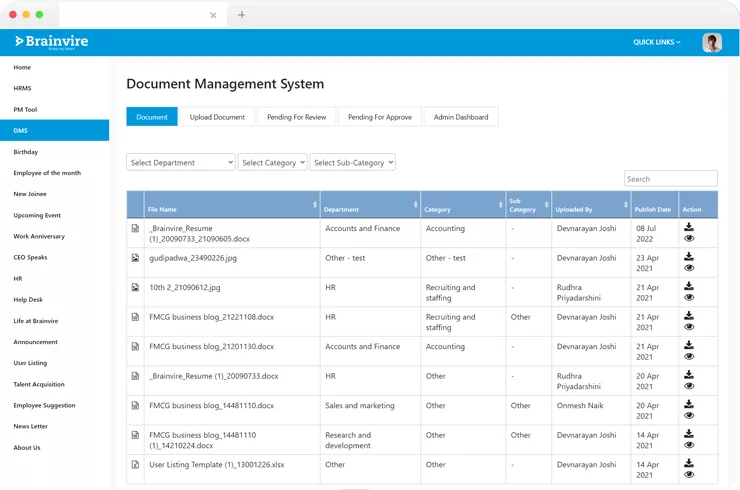
 Manufacturing · SharePoint + Power Apps
Power Apps
Automated production-ordering platform
Brainvire built an automated order-cycle platform on SharePoint and Power Apps, with One Drive and Planner and role-based access, for a North American manufacturer.
Read the case →
/ What we build
Eight practice areas of Microsoft 365 consulting, from the initial assessment to ongoing optimization, and one rule: clean up permissions before you switch anything on. AI is built into each area, not tacked on as a ninth line item.
Advisory on Microsoft licensing, architecture, and a right-sized Office 365 roadmap tied to your business objectives.
AI readiness assessment ConsultingTenant setup, provisioning, SharePoint setup, and rollout of Office 365 across the enterprise.
AI-guided rollout ImplementationSharePoint, Microsoft Teams, and Power Platform customized to your business processes.
AI-assisted low-code CustomizationMailboxes, files, and legacy systems migrated to Office 365 in validated stages, with integrity checks at every cutover.
AI-assisted migration MigrationOffice 365 wired to Dynamics, ERP, accounting software, and other line-of-business systems.
AI-reconciled data sync IntegrationDeployment and configuration of Microsoft Office apps and add-ins across every device.
AI-assisted provisioning DeploymentManaged Office 365 services: administration, updates, helpdesk, and technical support, with ongoing support for every user.
AI-triaged support 24×7 Managed ServicesLicense optimization, data security, and governance across the tenant, including unused licenses and cost control.
AI cost & security insights Governance


/ AI, built in
We roll out and govern Microsoft Copilot across Microsoft Teams, Outlook, and SharePoint so drafting, summarizing, and search happen in place.
Agentic Power Automate flows handle approvals, notifications, and document routing, taking repetitive tasks off people across the Microsoft 365 stack.
Models over real workplace data surface productivity, user adoption, and next-best-action signals for business leaders.
Automated compliance policies, data loss prevention, audit trails, and anomaly detection wired into every tenant we ship.
/ Accelerators
Each accelerator packages the playbooks, proven methodologies, pre-built assets and AI tooling from earlier Microsoft programs. The riskiest part of your Microsoft 365 rollout starts from a tested pattern, and business continuity is planned through the cutover.
A pre-built rollout playbook for a fast, clean launch: tenant setup, provisioning, multi-factor authentication, and a security baseline.
Mail, files, and legacy data moved to Office 365 with AI-assisted migration and validation, so business data arrives intact.
Pre-built Microsoft Teams, SharePoint, and Power Platform templates configured to your workflows, with file sharing and video conferencing ready from the first week.
License optimization, regulatory compliance, and governance with AI cost and security insights, and security policies your auditors can read.
/ Industries
Each vertical brings its own retention rules, compliance settings and reference architectures, from healthcare organizations to logistics operators.
Omnichannel platforms with unified inventory, AI merchandising, and storefronts that learn from every order.
See Retail & eCommerce work →HIPAA-conscious patient platforms, operational AI, and connected systems for providers and pharmacies.
See Healthcare work →Secure lending, payments, and decision-intelligence platforms built for audits, uptime, and scale.
See Finance & Fintech work →Dealer commerce, VIN & fitment catalogs, and service platforms connected to live inventory nationwide.
See Automotive work →PropTech platforms, CRM-ERP integration, and AI valuation models for developers and brokerages.
See Real Estate work →Route intelligence, warehouse automation, and end-to-end shipment visibility on one operational spine.
See Logistics work →Content platforms, subscription commerce, and audience analytics that turn viewers into recurring revenue.
See Media work →Learning platforms, enrollment systems, and AI tutoring experiences for institutions and edtech firms.
See Education work →/ In their words
Brainvire demonstrated reliability, a commitment to delivery, and helped us maintain momentum on critical roadmap items.
/ Recognition
2026Top eCommerce Developers
 2025
The Americas’ Fastest-Growing Companies
 2025
Fastest-growing private companies in America
 2024
North America’s fastest-growing tech companies
/ How it runs
The same six steps on every rollout. Nothing touches production until the assessment is agreed on and the rollback is written. Finance sees the license plan before renewal, IT signs identity and security, and department leads approve the week their people move.
A read-only assessment of the tenant, identity, mailboxes, file shares and licensing, with the business goals written down before a single option is priced. Your IT lead, a finance contact for licensing and our consultant run it together. You get a tenant report and a license map, and you sign off the target state before scoping starts.
AI-assisted tenant audit AssessmentScope, sequence and owners agreed on across the eight practice areas, so everyone knows which workload moves in which wave and who signs it off. The deliverable is a wave plan with a rollback per wave. How long the program runs depends on mailbox count, file volume and how many sites need rebuilding.
AI-modeled wave planning ScopingMailboxes and files move in waves, each with its own rollback point, then Microsoft Teams and SharePoint are built around the content that landed. Shared mailboxes and delegated permissions are what usually break, so the pilot wave tests them and the cutover checklist you approve lists them. That checklist is what gives each department a smooth transition.
AI-assisted migration checks MigrationApprovals, notifications and document routing rebuilt on the Power Platform, so the workflows people run every day stop living in an inbox. A flow nobody owns fails quietly, so every flow ships with a named owner and a manual fallback, and its process owner signs it off on real cases.
AI-suggested flow design AutomationPermissions, oversharing and retention are cleaned up first, because Copilot inherits them; only then is Microsoft Copilot switched on for the groups with a real use for it. Your security lead approves the permissions cleanup before any Copilot license is assigned.
AI adoption telemetry AI EnablementAdministration, patching, incident handling and license reviews on an agreed-on cadence, plus a standing review that revisits cost, adoption and the roadmap. At any review you can keep us on the run phase or move it to your own IT team.
AI anomaly detection on cost 24×7 Managed Services/ Questions, answered
A Microsoft Office 365 consultant assesses the environment you have, sets the licensing and architecture plan, runs the migration, configures Exchange Online, SharePoint and Microsoft Teams, and then stays on for managed support. Brainvire covers that whole arc rather than one phase of it.
Eight practice areas, listed in the services section above: consulting, implementation, customization, data migration, integration, app installation, support and maintenance, and cloud account management. Those consulting services are delivered by one team against one engineering standard.
With an initial assessment of your Microsoft environment: tenants, domains, mailboxes, file shares, identity, and the business goals behind the move. That assessment sets the scope and the sequence before anyone touches production.
Yes. Microsoft documents three routes from an on-premises Exchange Server, cutover, staged and hybrid, plus IMAP migration from systems such as Gmail and PST import through the Import Service. We pick the route the source supports, then reconcile item counts before cutover.
By inventorying the source first, running a pilot batch, reconciling counts after every wave, and keeping the source readable until sign-off. Data loss and unplanned downtime in Office 365 projects usually trace back to planning, not to tooling.
Yes. We map people to plans, reclaim unused licenses, and clear the licensing confusion that quietly turns into overspending. License posture is then reviewed on a schedule instead of once at go-live.
Largely, and the names overlap on purpose. Microsoft's announcement states that the new product names went into effect on April 21, 2020, with Office 365 Business Essentials becoming Microsoft 365 Business Basic and Office 365 Business Premium becoming Microsoft 365 Business Standard. The same announcement says the Office 365 enterprise plans E1, E3 and E5 had no changes, which is why both names are still in use.
Team and channel architecture, meeting and video conferencing policies, guest and external access, calling where it applies, and the governance that keeps sprawl down. Microsoft Teams then acts as the front door to SharePoint content rather than a second place to keep files.
Yes. SharePoint setup covers site architecture, libraries, metadata, versioning, retention and permissions, so document management has one home and file sharing through shared links replaces email attachments. The centralized document system in the case work above was built this way.
Power Automate flows for approvals, notifications and routing, Power Apps for forms and line-of-business screens, and Power BI for reporting. Used together they streamline workflows that otherwise live in inboxes and spreadsheets.
Yes. We connect Office 365 to Dynamics, ERP, CRM and accounting software, so people stop re-keying the same record into different systems. Integration work is scoped against the data that actually has to move, not against a connector list.
Identity hardening with multi-factor authentication and conditional access, then data loss prevention policies, sensitivity labels and audit trails. Microsoft Purview is the control surface for most of that, and its data loss prevention policies reach Exchange, SharePoint, OneDrive, Teams chat and managed devices.
We configure Microsoft 365 controls against the regulatory requirements you are held to, and we document what was set so an auditor can follow it. Whether a given control satisfies a given rule stays a decision you make with your own compliance officer, and we give you the evidence to make it.
Tenant administration, update and release management, incident handling, technical support for end users, and ongoing optimization of licenses and configuration. Client requests are triaged and tracked, and the ones that recur become automation or documentation.
Yes. Role-based training sessions, quick-reference material, and a champion network inside the business. User training is the line most rollouts underfund, and it is where the platform either lands or stalls.
By involving the people who do the work while the design is still open, training before launch rather than after it, and measuring usage afterward so additional training goes where the data says it is needed. That is also how user resistance gets surfaced early enough to answer.
That is the case the platform is built for. Remote work and distributed teams get the same identity, the same collaboration tools and the same file sharing wherever they sign in, with policy applied at the identity rather than the office network.
Yes, from a small business tenant through to a multi-region enterprise. The practice areas are the same; the governance, change management and depth of documentation are sized to the organization.
A continuous improvement loop. Usage and service health are reviewed, we identify areas where adoption or cost has drifted, and the backlog is reprioritized. Ongoing support keeps the business productive between those reviews.
Yes. We audit what is configured today, document it, correct what has drifted, and take the IT operations on from there. Nothing is rebuilt that does not need rebuilding.
In waves, never in one jump. Each wave has a rollback point, mail flow is dual-routed while it runs, and the cutover window is agreed on with the business. That is how we preserve business continuity for everyone who is not in the wave.
Ask which named Microsoft experts stay on the account after go-live, and ask for a migration runbook from a real project. Expert guidance shows up in the runbook long before it shows up in the pitch. We fit best with large user counts, regulated data or a messy multi-source migration. If the move is simple, say a small office leaving Gmail with no integrations, a good IT generalist will do it for less.
Usually yes, in a different shape. IT operations move from patching servers to identity, governance and vendor management. Exchange Online, Microsoft Entra ID and the Power Platform each need specialized knowledge that is hard to keep in-house full time, and we backfill expert support where a skill is missing rather than replace the team.
Four recur: licensing confusion, data loss during migration, security gaps left by rushed configuration, and user resistance after launch. Naming those potential risks during the assessment is most of the mitigation.
Exchange Online, SharePoint, Microsoft Teams, OneDrive, Outlook, the Power Platform, Microsoft Purview, Microsoft Entra ID and Microsoft 365 Copilot, plus Dynamics where an integration calls for it. Deep knowledge of how those Microsoft products behave together is what keeps an integration from breaking at the next service update.
Yes. Microsoft 365 Copilot grounds its answers in your own work content through Microsoft Graph and respects the permissions each user already has, so the data cleanup comes first: oversharing, stale sites, retention. Then we enable Microsoft Copilot and measure what people actually use.
Reassigning licenses to the people who use them, retiring unused licenses, right-sizing storage and add-ons, and dropping third-party tools that Microsoft 365 already covers. Cost control is a standing review item, not a one-off exercise.
Mailbox and file volume set most of it. Cost moves with how many mailboxes and how much file data move and how many source systems you're leaving. It also moves with how much Teams and SharePoint rebuilding you want and how much workflow automation is in scope. Licenses are billed separately. We quote a fixed-price phase 1 after the assessment, so the budget is agreed before the first mailbox moves.
Yes. One accountable project manager, a published plan, a weekly status and a live risk log. The strategic planning happens before that plan exists, and the plan is what the business signs.
The roadmap is written against your business strategy and business needs rather than a feature list. If a workload does not move a business objective, it waits, and that is a deliberate call rather than a backlog accident.
Us first. We triage, and where the fault sits inside the service itself we contact Microsoft support on your behalf and carry the case to closure. You get one queue and one owner, not two.
Yes. Advanced tools such as Power BI, Microsoft Purview and Viva add reporting, governance and adoption insight on top of the core apps. We turn them on where there is a use for them, not to make the license look busier.
It changes how the platform is used rather than which logo is on the login page. Consultants align licenses with real user needs, integrate the apps into daily workflows, and put governance behind them, which is where the productivity improvement and the reduction in IT overhead come from.
Microsoft's guidance keys it to the source and the size. Cutover or express migration suits Exchange 2003 through 2013 estates under 2,000 mailboxes, staged migration suits larger Exchange 2003 and 2007 estates, and hybrid suits Exchange 2013 or later or anyone who wants to move in small batches over time.
Microsoft documents data loss prevention policies acting across Exchange, SharePoint, OneDrive, Teams chat and channel messages, Office applications, Windows and macOS devices, on-premises file shares and on-premises SharePoint, and Fabric and Power BI workspaces. Policies can warn, block, block with an override, or quarantine an item.
Yes. Microsoft Purview's unified audit log captures and retains thousands of user and admin operations across Microsoft services. Microsoft documents 180-day retention as the Audit Standard default, with longer retention available through audit log retention policies.
Microsoft describes cloud flows, which are triggered automatically, instantly or on a schedule, and desktop flows for automating tasks on the web or the desktop. Approvals, notifications and document routing are the three that pay for themselves first in a Microsoft 365 tenant.
Microsoft documents that the licensed Copilot experience grounds responses in organizational data, emails, files, meetings, calendars and organizational relationships, through Microsoft Graph, and that access is scoped by each user's existing permissions. That is precisely why permission hygiene is a prerequisite rather than a follow-up.
Change management is the part that decides whether the technology lands. Assessing current workflows identifies the productivity gaps worth closing, tailored training raises adoption, and monitoring usage after go-live is what keeps the improvement from fading.
Identity first, then the data. Multi-factor authentication and conditional access at sign-in, encryption and sensitivity labels on the content, data loss prevention on the egress paths, and monitoring to maintain compliance as the estate changes. Risk assessments repeat because the estate keeps moving.
Ask how they scope the initial assessment, what happens in week one, who is accountable when a wave slips, and how they hand over documentation. A consultant's effectiveness depends on understanding your specific constraints, so a pitch that never asks about yours is a signal.
No. Licensing everyone is not the same as boosting productivity. Microsoft 365 starts to improve productivity when the tools are configured for the way people actually work, when the training lands, and when someone keeps optimizing after the project team leaves.
/ Next step
A 30-minute working session with a Brainvire Microsoft Office 365 consultant: your Office 365 roadmap, migration and licensing, and how you'll know people actually use it.
Book a working session →Cookies on this site
Essential cookies are always on. They keep the site secure and make forms work.
We also use Google Analytics and Microsoft Clarity to see how the site is used. We only turn these on if you accept.